Deiland: A Playful and Modern Display Font for Creative Projects
Fonts are more than just letters on a page—they're the voice of your design. Choosing the right typeface can transform an ordinary project into something eye-catching and expressive. One font that has been gaining popularity among designers, crafters, and creative professionals is Deiland. Known for its modern yet playful aesthetic, Deiland brings a unique charm to logos, posters, invitations, and other visual projects where personality matters.
What Makes Deiland Stand Out?
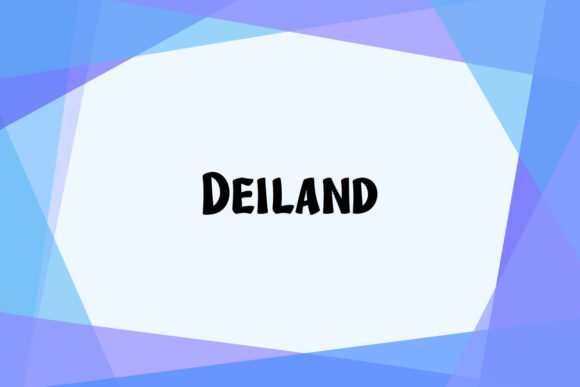
Deiland is a display font created by Kong Font Studio, available through platforms like Creative Fabrica. It's designed with creativity in mind, making it ideal for those who want their text to stand out without being overly serious or traditional. The font features rounded edges, open counters, and a slightly whimsical structure that gives it a friendly and approachable feel.
Display fonts like Deiland are not meant for long blocks of text but rather for headlines, titles, and short phrases where impact is key. Its character set includes a wide range of glyphs, ligatures, and stylistic alternates, allowing users to customize their designs further and add a personal touch.
Key Features of Deiland
- Playful Design: With soft curves and a casual rhythm, Deiland adds a sense of fun and energy to any project.
- Modern Aesthetic: Clean lines and balanced proportions make it suitable for contemporary design styles.
- Compatibility: Works seamlessly with major design tools such as Photoshop and Silhouette Design Studio, making it accessible for both digital and physical crafting.
- Extensive Character Set: Includes uppercase and lowercase letters, numbers, symbols, and special characters to support a variety of uses.
- Creative Flexibility: Offers multiple weights and stylistic options to adapt to different design needs.
Who Can Benefit from Using Deiland?
Deiland is particularly well-suited for individuals and businesses involved in creative industries. Whether you're a graphic designer, a wedding planner, a small business owner, or a hobbyist crafter, this font can enhance your work’s visual appeal. Here are some common use cases:
For Crafters and DIY Enthusiasts
If you're into scrapbooking, card making, or other paper crafts, Deiland can bring a fresh and vibrant look to your creations. Its playful nature makes it perfect for adding titles, headings, or decorative elements to handmade items. When paired with tools like Silhouette Design Studio, you can easily cut out letters and shapes for stencils, signs, or custom decals.
For Graphic Designers and Artists
Graphic designers often need fonts that reflect the tone of their brand or message. Deiland is excellent for branding materials, social media posts, and packaging designs where a lively and engaging style is desired. Its versatility allows it to fit into both children-oriented and trendy adult-focused content, depending on how it's used.
For Business Owners and Marketers
Business owners looking to create a memorable brand identity may find Deiland beneficial. From signage to promotional materials, this font helps establish a visual presence that's both inviting and professional. It’s especially useful for startups and small businesses aiming to differentiate themselves in a competitive market.
Real-World Applications of Deiland
To understand the practical value of Deiland, let’s explore a few real-world scenarios where it could be used effectively:
- Wedding Invitations: Add a touch of elegance and playfulness with Deiland for names or titles on save-the-dates or invitations.
- Children’s Book Covers: Use Deiland to create engaging and colorful book covers that appeal to young readers.
- Restaurant Menus: Highlight special dishes or promotions with this font to draw attention and create a warm atmosphere.
- Social Media Graphics: Make your Instagram, Facebook, or Pinterest posts pop with catchy headlines and banners using Deiland.
- Merchandise Branding: Print slogans or product names on t-shirts, mugs, or stickers to give them a modern and fun twist.
Design Tips When Using Deiland
- Pair it with a clean sans-serif or serif font for body text to maintain readability while keeping the overall design cohesive.
- Use bold weights or outlines to emphasize important phrases or calls to action.
- Experiment with color gradients or shadows to add depth and dimension to the text.
- Keep spacing tight and consistent for a polished appearance, especially when working with larger text sizes.
Evaluating Deiland for Your Needs
Before deciding to use Deiland in your next project, consider what you’re trying to achieve. Ask yourself questions like:
- Do I need a font that conveys warmth and friendliness?
- Is my project more about visual impact than readability in large volumes of text?
- Am I working on a design tool that supports high-quality display fonts?
- Will the font complement the existing visuals and colors in my layout?
Answering these questions can help determine whether Deiland is the right choice. While it excels in display settings, it may not be appropriate for body copy in books, websites, or reports due to its stylized form. However, when used correctly, it can become one of the standout elements in your design.
Strengths and Limitations
Like all fonts, Deiland has its strengths and limitations. On the positive side, it offers a strong visual identity, which is crucial for creative projects. Its compatibility with popular design software also makes it easy to integrate into various workflows. Additionally, its playful yet modern vibe can resonate well with target audiences seeking innovation and creativity.
On the other hand, because it’s a display font, it isn't optimized for extended reading. Users should avoid using it in situations where clarity over long passages is essential. Also, while it works well in print and digital formats, certain screen resolutions might affect how it appears online. Always preview the font in context before finalizing your design.
How to Access and Use Deiland
Deiland is available for purchase at Creative Fabrica, a platform known for offering high-quality fonts and graphics. Once downloaded, it can be installed on your computer or accessed directly within supported design applications. For users of Adobe Photoshop or Silhouette Design Studio, installing Deiland is straightforward and usually requires just a few steps.
Here’s a quick guide to getting started:
- Visit the Creative Fabrica website and search for “Deiland”.
- Purchase the font and download the .OTF or .TTF file based on your system (Windows or Mac).
- Install the font by double-clicking the file and following the prompts.
- Open your preferred design software and select Deiland from the font menu.
Testing Deiland in Different Contexts
After installation, test Deiland in different contexts to see how it performs. Try using it for:
- A logo mockup
- A poster headline
- A greeting card title
- A banner for a social media post
These tests will help you gauge how the font interacts with your design elements and whether it aligns with your intended message and style.
Alternatives to Consider
While Deiland is a fantastic option for many creative projects, it’s always good to have alternatives in case it doesn’t quite fit your vision. Some similar display fonts include:
- Bubblegum Sans – another playful, rounded font with a similar vibe.
- Quicksand – a more versatile, modern sans-serif with a softer edge.
- Comic Neue – great for a casual, cartoonish look.
Each of these fonts has its own characteristics, so experimenting with them alongside Deiland can help you choose the best match for your specific needs.
Final Thoughts on Deiland
In summary, Deiland is a versatile and expressive font that brings a modern, playful energy to any design. Created by Kong Font Studio, it’s tailored for creators who want their work to stand out. Whether you're designing for a personal project or a commercial campaign, Deiland can add a unique flair that captures attention and communicates personality.
When selecting a font, it’s important to think beyond aesthetics—consider usability, compatibility, and the message you want to convey. Deiland checks many boxes in these areas, making it a valuable addition to your design toolkit. Just remember to use it wisely and pair it with complementary elements to ensure a balanced and effective result.